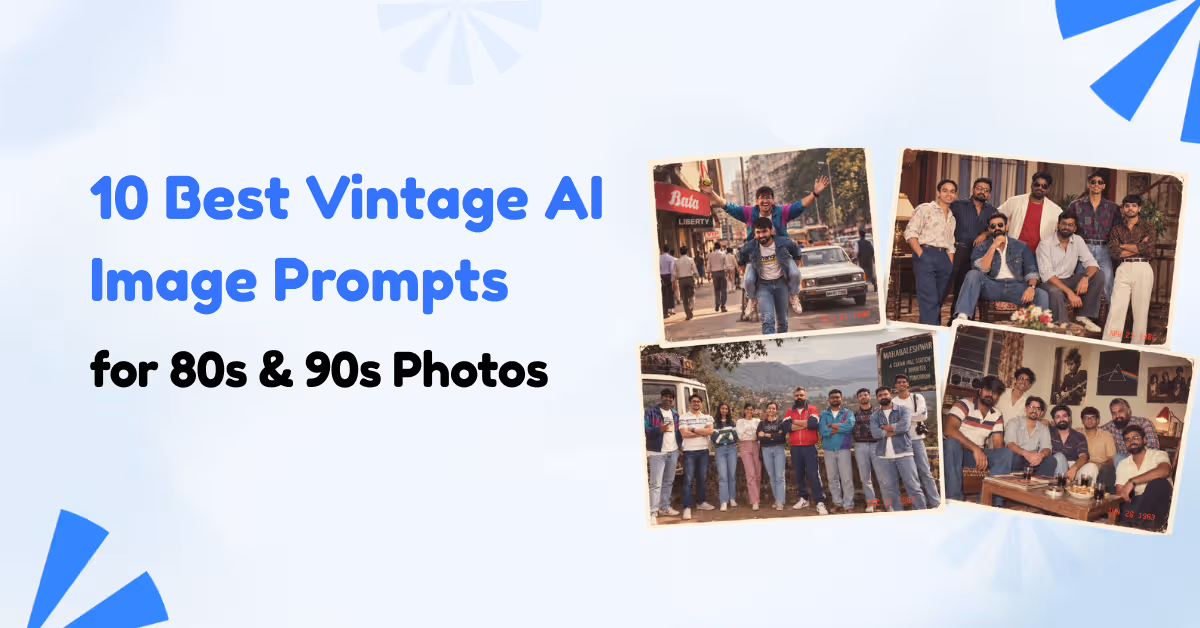
10 Best Vintage AI Image Prompts for 80s & 90s Photos
Gaurav Poswal
CEO at Soocel
12/09/2026
8 min read
There is something different about an old photograph. The slightly faded colors, imperfect framing, visible grain, direct flash and little details in the background can make a picture feel like a memory rather than a perfectly produced image.
That is one reason vintage AI image prompts have become so popular.
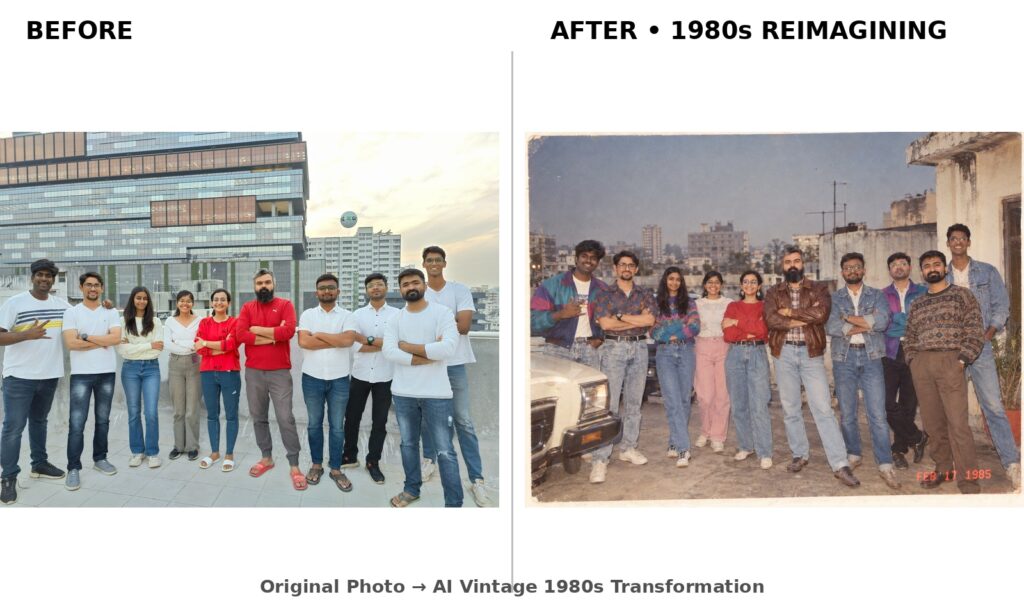
The latest AI photo trend goes beyond putting a retro filter over a modern selfie. People are uploading their photographs and asking AI image tools to reimagine them as if they were photographed during the 1980s or 1990s. The hair changes. Clothing changes. Backgrounds become period-appropriate. Camera characteristics, lighting and film texture are recreated to make the final image look like an old photograph.
Recent examples of the trend have focused particularly on 1980s and 1990s transformations, including family-album photographs, studio portraits, college pictures, street photography and Bollywood-inspired retro images.
The interesting part is that you do not need an actual photograph from that period. With a clear reference photo and a carefully written prompt, an AI image generator can create a convincing interpretation of how you might have looked in another decade.
In this guide, you will find some of the best vintage AI image prompts for creating 80s and 90s photographs, along with practical tips for making the results look genuinely photographic instead of simply “AI with a vintage filter.”
Vintage AI image prompts are instructions that tell an image generation or editing model to recreate an image with the visual characteristics of an earlier period.
The word “vintage” by itself is usually not enough.
If you simply ask an AI tool to “make my photo vintage,” it may add sepia tones, scratches or heavy grain without actually making the photograph look historically accurate. A stronger prompt tells the model which decade you want, what people wore during that period, how the photograph was captured, what the surroundings looked like and how the final film should appear.
For example, an effective 1980s prompt might mention:
Element
What to specify
Era
Mid-1980s, late 1980s or a specific year
Clothing
Period-appropriate shirts, dresses, denim, sarees or formal wear
Hair
Hairstyles associated with the chosen decade
Camera
35mm film, consumer camera or studio camera
Lighting
Direct flash, soft studio light or natural light
Film
Analog grain, faded colors and soft contrast
Environment
Home, college, street, wedding, studio or holiday setting
Composition
Candid snapshot, portrait or family photograph
This level of detail gives the model a much clearer visual direction.
Why the 80s and 90s AI Photo Trend Looks So Convincing
The strongest images in this trend do not depend on one effect.
They recreate an entire photographic environment.
An authentic 1980s photograph, for example, might have bold clothing, distinctive hairstyles, statement accessories, warm colors and the optical characteristics of an analog camera. A 1990s family snapshot might look more casual, with denim, simple shirts, direct flash and the slightly imperfect framing associated with consumer cameras.
That difference matters.
Current examples of popular 80s and 90s prompts specifically emphasize period styling, camera characteristics, film grain, lighting and realistic imperfections rather than relying on a generic “retro” instruction.
Another important detail is restraint.
Too much grain, excessive scratches or extreme sepia can make an image look like an artificial vintage effect. Real photographs from the period were not necessarily covered in scratches or dramatically brown. Many were simply ordinary color photographs captured on consumer film and printed on photographic paper.
That ordinary quality is often what makes an AI-generated image feel believable.
10 Best Vintage AI Image Prompts
The following prompts are designed for image editing with a personal reference photograph. They can be adapted for tools such as ChatGPT and Gemini, as well as other AI image generators that accept an uploaded image.
For the best results, start with a clear photograph where the person’s face is reasonably visible.
1. Classic 1980s Flashback Prompt
This is a good starting point if you want the classic viral 80s transformation.
Using my uploaded photo, show me what I would have looked like around 1985. Preserve my identity, facial features, skin tone, age, and recognizable appearance. Reimagine my hairstyle, clothing, accessories, and surroundings with authentic mid-1980s fashion, including expressive silhouettes, statement accessories, layered details, distinctive colors, and period-accurate textures. Place me in a realistic everyday setting from 1985. Make the photograph look genuinely analog, with natural 35mm film grain, slightly faded colors, direct on-camera flash, soft optical detail, subtle exposure imperfections, and the texture of an old printed photograph. Add a small red-orange 1980s date stamp in the lower corner. No modern objects, smartphones, contemporary clothing, logos, or unnecessary text.
The important difference here is that the prompt asks the model to recreate the whole photograph rather than simply applying a filter.
2. Retro Bollywood-Inspired Prompt
For Indian audiences, a Bollywood-inspired version can make the article much more relevant.
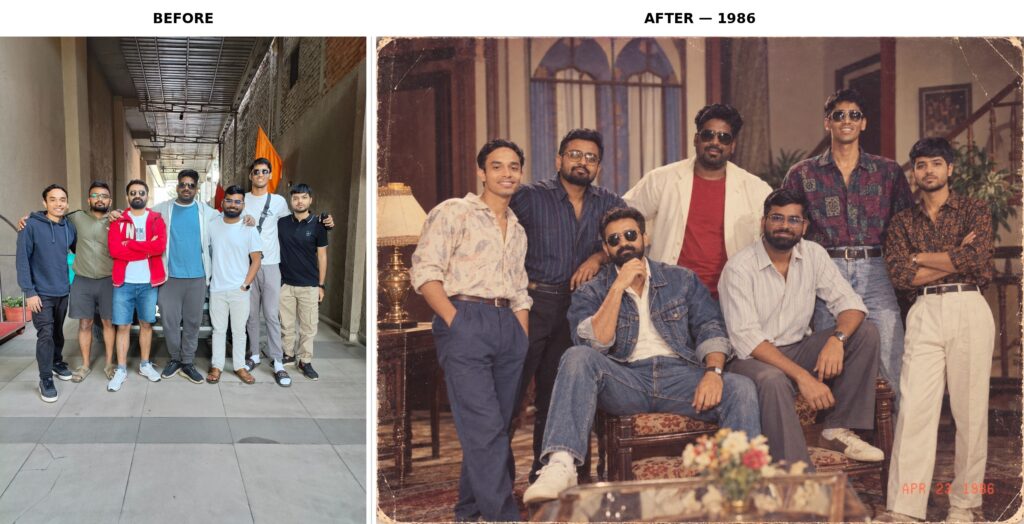
Using my uploaded photo, reimagine me in the visual atmosphere of an Indian photograph from around 1986. Preserve my exact recognizable identity, facial features, skin tone, age and natural facial proportions. Give me authentic mid-1980s Indian fashion, hairstyle and accessories appropriate to the period. Create a cinematic Bollywood-inspired setting with expressive posing, rich fabrics, dramatic but realistic studio lighting and period-appropriate surroundings. The photograph should resemble an old Indian color-film photograph with warm analog tones, natural grain, slightly faded colors, soft detail and subtle imperfections from an aged print. Keep the result photographic and realistic rather than looking like a movie poster. Add a small red-orange 1986 date stamp. No modern technology, contemporary fashion, logos or unnecessary text.
Retro Bollywood-Inspired Prompt
When using a cinematic theme, it is better to describe the era and photographic qualities than to ask the model to copy a specific living person’s appearance.
3. 1980s Street Style Prompt
The street setting gives the AI more room to recreate the decade.
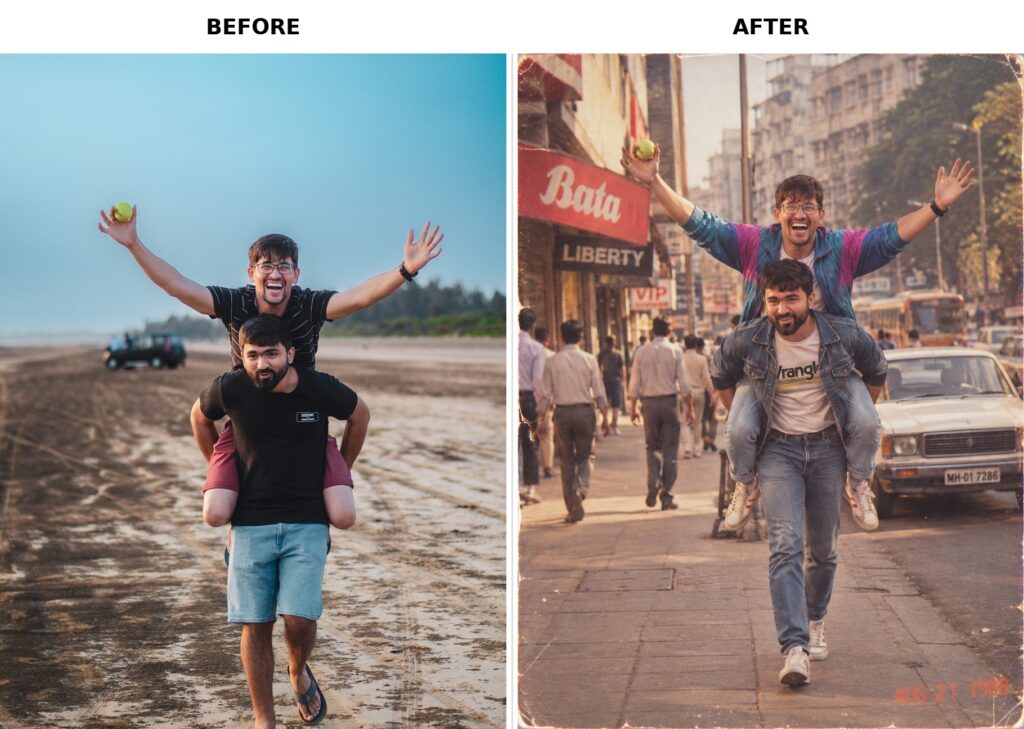
Using my uploaded photo, show me as a stylish person photographed on an authentic 1980s city street. Preserve my identity, facial features, skin tone, age and recognizable appearance. Reimagine my hairstyle, clothing and accessories using genuine 1980s street fashion. Include period-appropriate cars, storefronts, architecture and everyday street details in the background. Make the image look like a candid 35mm film photograph captured by a friend, with natural composition, slight motion softness, warm faded colors, visible but realistic film grain and imperfect exposure. The scene should feel spontaneous rather than staged. Add a subtle red-orange 1980s date stamp in the lower corner. No smartphones, modern vehicles, contemporary clothing, modern signage or digital photography characteristics.
1980s Street Style Prompt
4. 1980s Studio Portrait Prompt
For a more polished result, try a vintage studio portrait.
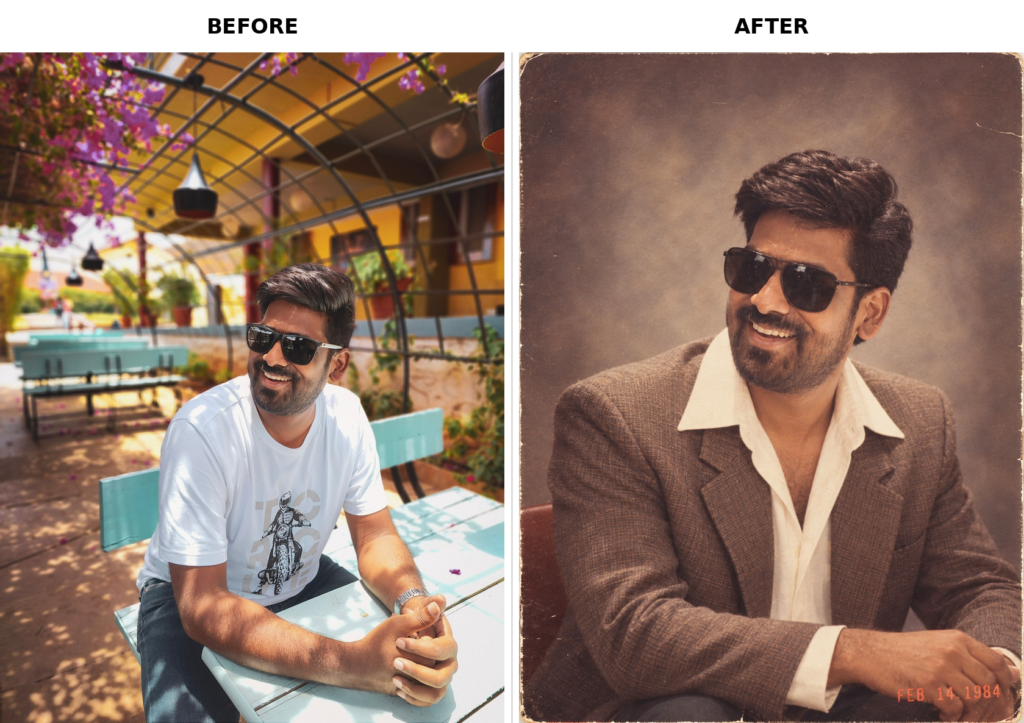
Using my uploaded photo as the identity reference, recreate me as if I were photographed in a professional portrait studio around 1984. Preserve my recognizable identity, facial structure, skin tone, age, and natural facial characteristics. Give me an authentic early-to-mid-1980s hairstyle, clothing and accessories. Use a simple period-appropriate studio backdrop, classic portrait lighting, natural skin texture and a relaxed expression. Make it look like a real 1984 studio photograph captured on 35mm film, with soft focus, fine analog grain, warm but slightly faded colors, gentle contrast and subtle imperfections from an old photographic print. Add a small red-orange 1984 date stamp in the lower corner. Avoid modern styling, digital sharpness, contemporary objects, logos and artificial-looking skin.
1980s Studio Portrait Prompt
This style works particularly well for individual portraits because the simple background gives the model fewer elements to distort.
5. 1980s Family Album Prompt
Want something that looks less like a professional photoshoot and more like a photograph discovered in an old album?
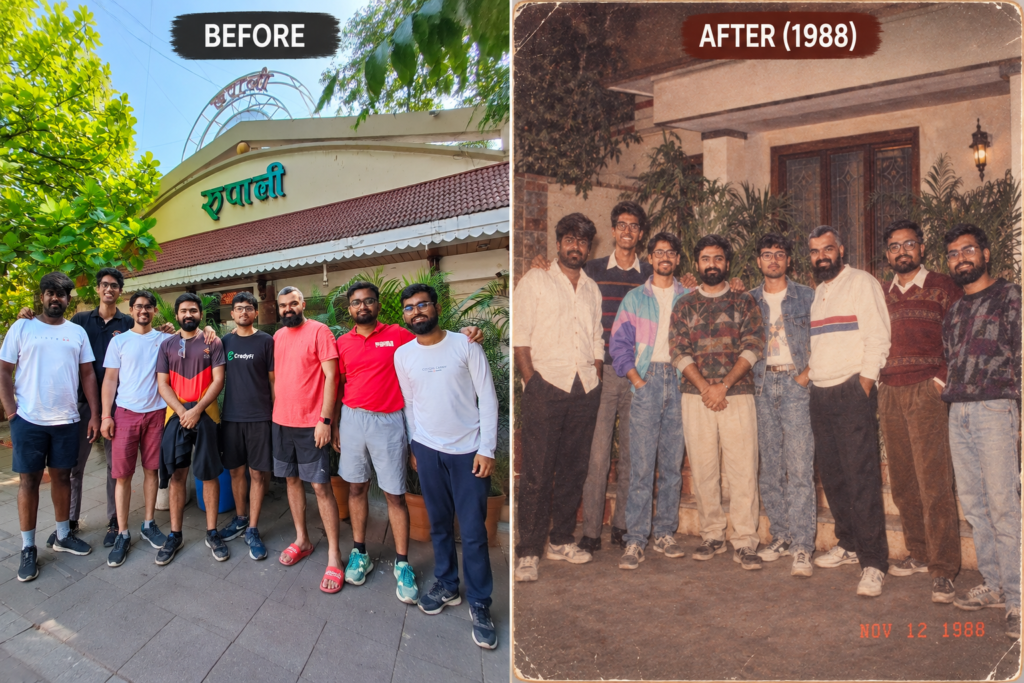
Using my uploaded photo, recreate me as if I were photographed at a family gathering in the late 1980s. Preserve my identity, facial features, skin tone, age and recognizable appearance. Give me authentic late-1980s clothing, hairstyle and accessories. Place me inside a modest period-appropriate home with vintage furniture, patterned curtains and natural household details. Capture the image like an ordinary family snapshot taken with a consumer film camera and direct flash. Use slightly faded colors, realistic film grain, mild softness, imperfect framing and subtle exposure variations. The final image should feel like a genuine photograph printed decades ago, not a modern photo with a filter. Add a small red-orange date stamp in the lower corner. Remove all modern objects and technology.
1980s Family Album Prompt
This type of prompt is particularly effective because it does not try to make the photograph perfect.
6. 1990s School or College Photo Prompt
The 90s have their own visual language.
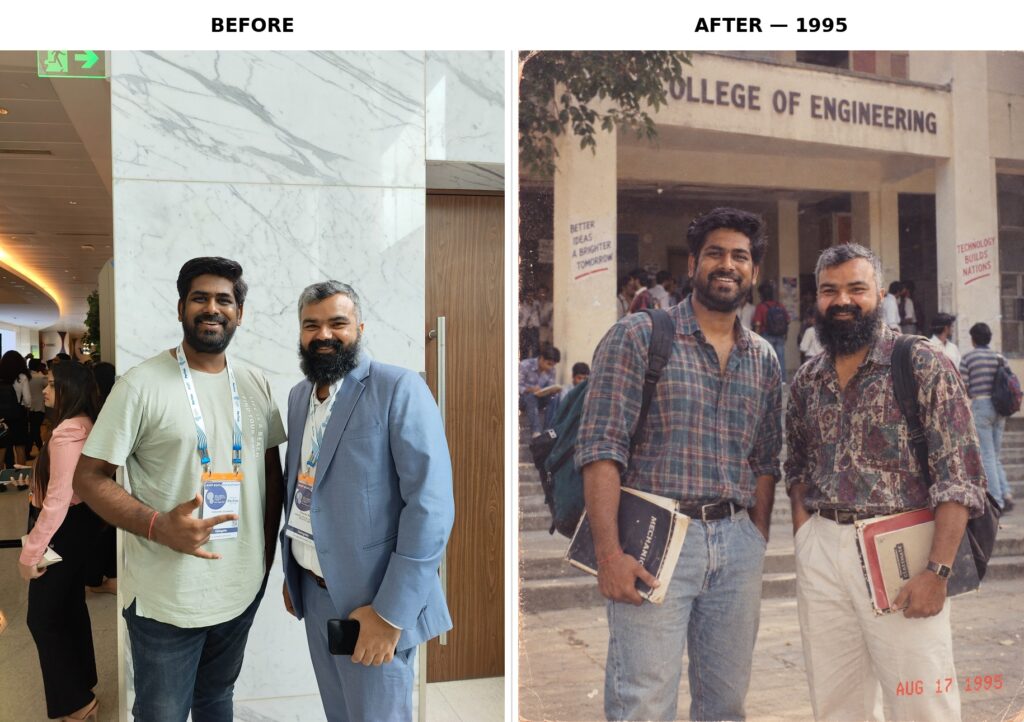
Using my uploaded photo, show me as I might have looked around 1995. Preserve my identity, facial features, skin tone, age and recognizable appearance. Reimagine my hairstyle, clothing and accessories using authentic mid-1990s fashion. Place me in a period-appropriate school or college environment with simple furniture, notebooks, bags and other subtle details from the decade. Use a casual, slightly awkward pose similar to an ordinary student photograph. Capture the image with a consumer film camera and direct flash, using realistic 1990s film colors, moderate grain, slightly faded tones, soft focus and imperfect framing. Add a small red-orange 1995 date stamp in the lower corner. No smartphones, modern screens, current fashion or contemporary objects.
1990s School or College Photo Prompt
This can produce a particularly nostalgic result because school and college photographs are strongly associated with the 1990s aesthetic.
7. 1990s College Canteen Snapshot
A College Canteen can create a much more personal image.
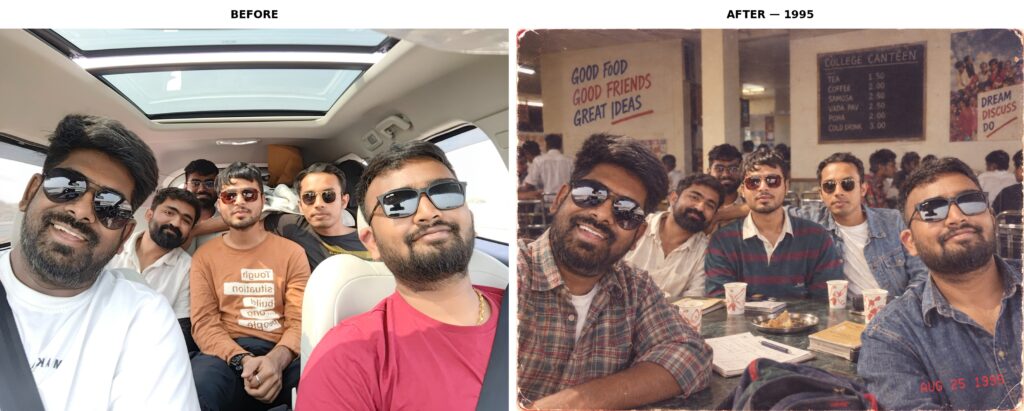
Using my uploaded photo as the identity reference, recreate me as if I were photographed at a college canteen around 1995. Preserve my identity, facial features, skin tone, age, facial proportions, and recognizable appearance. Give me authentic mid-1990s casual fashion, hairstyle, and accessories appropriate to the era. Place me casually seated at a simple canteen table with a few friends in the background, creating the feeling of an unplanned photograph taken during an ordinary college day. Include period-accurate details such as metal chairs, simple tables, notebooks, paper cups, backpacks, handwritten notes, old posters, and a modest campus atmosphere. Capture the photograph from a slightly imperfect handheld angle, as though a friend quickly took the picture with a consumer point-and-shoot camera. Use authentic 1990s color-film characteristics, direct on-camera flash, natural analog grain, slightly muted colors, soft optical detail, uneven exposure, and subtle photographic imperfections. Keep the people and environment natural rather than posed or cinematic. Add a small red-orange 1995 date stamp in the lower corner. No smartphones, modern electronics, contemporary clothing, modern furniture, visible logos, or modern text.
1990s College Canteen Snapshot
8. 1980s Vacation Snapshot Prompt
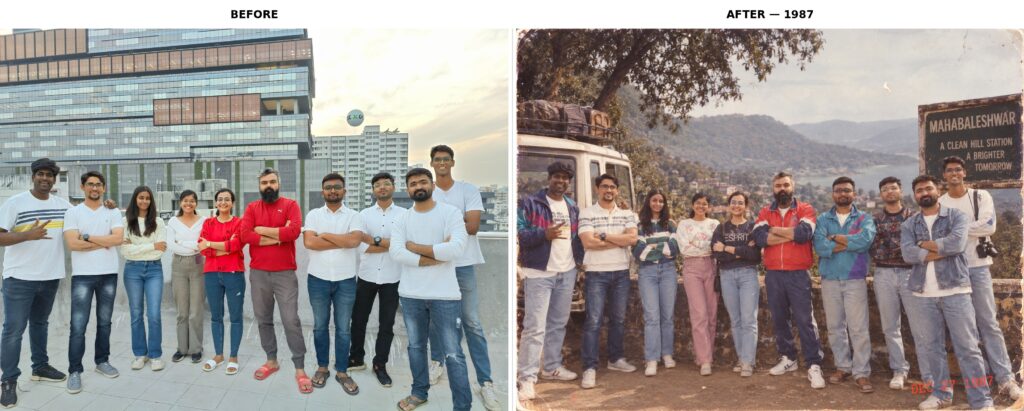
Using my uploaded photo, transform me into a candid vacation photograph from approximately 1987. Preserve my identity, facial features, skin tone, age and recognizable appearance. Dress me in authentic 1980s holiday clothing with period-appropriate hair, accessories and styling. Place me in a realistic vacation setting with vintage travel details, period cars, classic architecture and natural scenery. Capture a spontaneous expression and slightly imperfect composition, as if someone took the photograph with a consumer film camera during a family holiday. Use direct flash, analog film grain, mildly faded colors, subtle overexposure, soft detail and realistic photographic imperfections. Add a small red-orange 1987 date stamp in the lower corner. No modern technology, contemporary vehicles, smartphones or modern clothing.
1980s Vacation Snapshot Prompt
9. 1990s Mall Photo Prompt
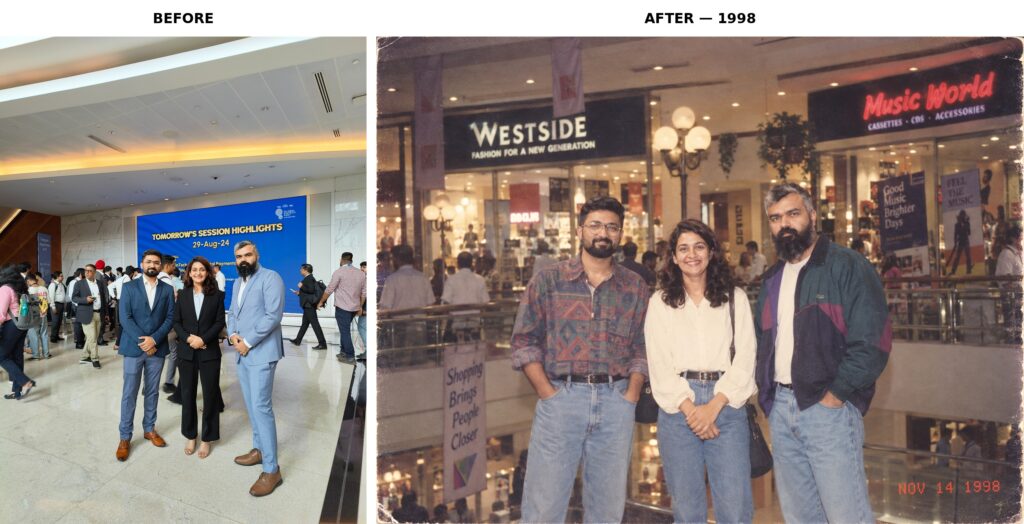
Using my uploaded photo, show me as if I were photographed inside a shopping mall around 1998. Preserve my identity, facial features, skin tone, age and recognizable appearance. Reimagine my hairstyle, clothing and accessories using authentic late-1990s fashion. Create a believable mall environment with period-appropriate storefronts, furniture, decorations and shopping details. Make the image resemble a casual disposable-camera photograph with direct flash, visible but natural film grain, slightly muted colors, soft focus and imperfect framing. Keep the expression relaxed and candid. Add a small red-orange 1998 date stamp in the lower corner. Remove smartphones, modern screens, contemporary fashion, modern branding and digital-camera characteristics.
1990s Mall Photo Prompt
10. Vintage Instant Photo Prompt
Finally, you can create something that feels like a personal photograph rather than a formal portrait.
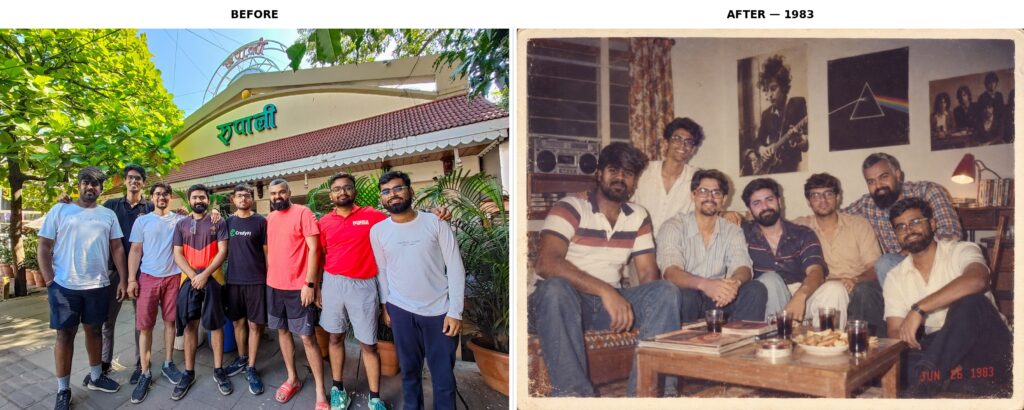
Using my uploaded photo, recreate me as a spontaneous personal photograph from around 1983. Preserve my identity, facial features, skin tone, age and recognizable appearance. Give me an unmistakably early-1980s hairstyle, clothing, accessories and styling. Place me in an intimate everyday setting and capture a relaxed natural expression with slightly imperfect framing. Make the image resemble an authentic vintage instant photograph, with soft detail, subtle light variation, faded colors, analog grain, gentle color shifts, mild exposure imperfections and the physical texture of an old printed photo. Avoid excessive scratches or artificial aging. Add a small red-orange 1983 date stamp in the lower corner. No modern objects, smartphones, contemporary clothing, logos or unnecessary text.
Vintage Instant Photo Prompt
How to Make Vintage AI Images Look More Real
The biggest mistake people make is treating vintage photography as a color effect.
A convincing result needs more than faded colors.
Think about how the original photograph would actually have been created. What camera might have been used? Was it a studio portrait or a family snapshot? Was the photograph taken indoors with flash? What clothes would the person have worn? What would have been visible in the background?
These details give the AI something concrete to reconstruct.
For example, “make this photo look 1980s” is vague. “Recreate this as a 1985 family snapshot captured on a consumer 35mm camera with direct flash, slightly faded color film and an ordinary living-room background” gives the model a much stronger direction.
Another useful technique is to specify what should not appear. Modern phones, smartwatches, contemporary cars, current hairstyles and digital-camera sharpness can immediately break the illusion.
Identity Preservation Is Especially Important
When you are transforming a photograph of yourself, the vintage styling should change the setting and presentation without turning you into a completely different person.
A good prompt should therefore explicitly ask the model to preserve recognizable facial characteristics, skin tone and identity. Some image-editing prompts go even further by identifying the uploaded photograph as the sole facial reference and warning against generic faces, face replacement and excessive beauty retouching.
Still, no prompt can guarantee perfect identity preservation every time.
If the face changes noticeably, try a clearer reference photograph and reduce the number of major changes requested in one generation. You can also tell the model to prioritize the person’s facial identity over cosmetic alterations.
Vintage Does Not Always Mean Sepia
This is worth remembering.
A common AI mistake is to interpret “vintage” as black and white or brown sepia. But an authentic 1980s or 1990s photograph can be full of color.
For an 80s image, you might want warm reds, yellows, blues and slightly faded highlights. For a 90s snapshot, muted consumer-film colors and direct flash may work better.
The goal is not to make the image look old. The goal is to make it look as though it was photographed during that period.
That is a subtle but important distinction.
80s vs 90s: Which Style Should You Choose?
If you cannot decide between the two decades, the visual difference can be summarized like this:
Feature
1980s
1990s
Fashion
Bold, expressive, layered
Casual, denim-heavy, relaxed
Hair
Voluminous and styled
Natural, layered or casual
Photography
Studio portraits and film snapshots
Point-and-shoot and candid snapshots
Lighting
Flash and dramatic studio lighting
Direct flash and softer everyday lighting
Colors
Warm, colorful and sometimes saturated
More muted consumer-film tones
Settings
Homes, studios, streets, weddings
Schools, malls, bedrooms, colleges
Overall mood
Bold and nostalgic
Casual and personal
Neither is necessarily better. It depends on the kind of memory you want the image to suggest.
How to Use Vintage AI Image Prompts in ChatGPT or Gemini
The process is straightforward.
Start by choosing a clear photograph. A front-facing image usually makes identity preservation easier, especially when the face is not hidden by sunglasses, hair or extreme shadows.
Upload the image to your chosen AI image tool and paste the prompt. If the first result looks too modern, do not immediately rewrite the entire prompt. Identify what is wrong.
If the clothes look modern, ask for more period-accurate clothing. If the photograph looks too digitally sharp, ask for natural optical softness and analog film characteristics. If the face has changed, reinforce the identity-preservation instruction.
Changing one element at a time usually makes troubleshooting easier.
Current prompt examples for this trend similarly recommend starting with a clear reference image, explicitly naming the decade and checking the final result for modern objects, altered facial features and other inconsistencies.
Common Problems With Vintage AI Photos
Sometimes an image looks “AI-generated with a vintage filter” instead of looking like a genuine old photograph.
There are a few common reasons.
The decade is unclear. Saying “retro” leaves too much room for interpretation. Mention a specific year or a narrow period.
The background is modern. A modern phone, LED screen, contemporary car or current furniture can destroy the illusion even if the subject looks perfect.
The image is too clean. Modern digital photography tends to have extremely sharp details. Adding realistic analog softness and film grain can help.
There is too much artificial aging. Heavy scratches, excessive dust and extreme sepia can look less authentic than a lightly faded color photograph.
The face changes. Strengthen the identity instruction and use a better reference photograph.
The clothes do not match the decade. Be specific about the type of clothing rather than simply saying “vintage outfit.”
Why These Prompts Work Better Than a Simple “Vintage Filter”
A filter changes the appearance of an existing photograph.
A good AI image prompt can change the photographic story itself.
Instead of taking a modern selfie and putting grain over it, the model is being asked to imagine the person, clothing, environment, lighting and camera characteristics as belonging to another period.
That is why the strongest prompts contain several layers of information: identity, decade, styling, environment, camera, lighting, film characteristics and exclusions.
The emerging prompt trend reflects exactly this approach. Current examples emphasize that the decade should be represented through the entire photograph, including clothing, hairstyle, location, camera character and analog texture.
Frequently Asked Questions
What are vintage AI image prompts?
Vintage AI image prompts are text instructions used to create or edit photographs so they resemble images from an earlier era. They can specify a decade, clothing, hairstyle, location, camera type, lighting, film grain and other photographic characteristics.
What is the 80s AI photo trend?
The 80s AI photo trend involves uploading a modern photograph and using AI to recreate the person as if the image had been captured during the 1980s. The effect usually includes period fashion, hairstyles, backgrounds, analog photography and film texture. The trend has recently gained significant attention across social media and AI prompt websites.
What is the best vintage AI image prompt?
There is no single best prompt for every image. A strong prompt clearly identifies the decade and combines identity preservation with period-accurate clothing, surroundings, lighting, camera characteristics and film texture. For the current 80s trend, the classic 1985 flashback prompt is a good starting point because it combines these elements without making the image excessively complicated.
Can I use vintage AI image prompts in ChatGPT?
Yes. Image-editing prompts can be used with ChatGPT when an image generation or editing feature is available. Upload your photograph, provide the prompt and review the generated result. The same basic prompt structure can also be adapted for other image-generation platforms.
Can I use these prompts in Gemini?
Yes. The same principles apply to Gemini and other AI image tools that support reference images. You may need to adjust the wording slightly depending on how the particular tool handles image editing.
How do I make an AI photo look like the 1980s?
Mention a specific year or period, use authentic 1980s clothing and hairstyles, add a period-appropriate environment and specify analog photography characteristics such as 35mm film, natural grain, faded colors, direct flash and subtle softness.
How do I make an AI photo look like the 1990s?
Use a specific 1990s year and describe the clothing, hairstyle and setting. Point-and-shoot photography, direct flash, casual styling, denim, slightly muted colors and consumer-film grain can help create a convincing 1990s appearance.
Why does my AI vintage photo still look modern?
The prompt may not contain enough period-specific information. Check the clothing, hairstyle, background, lighting and camera characteristics. Modern objects such as smartphones, smartwatches, contemporary cars and current furniture can also make the image look modern.
How do I preserve my face in an AI vintage photo?
Tell the image model to use the uploaded photograph as the identity reference and preserve recognizable facial features, facial proportions, skin tone and natural appearance. Avoid asking for unnecessary facial beautification or major changes to the person’s features.
Can I create an old family photo with AI?
Yes. Family-album prompts can be particularly effective because they allow you to recreate ordinary environments such as living rooms, weddings, holidays and school gatherings. A candid composition, direct flash and slightly imperfect film appearance can make the result feel more authentic.
What is the difference between a vintage photo and a retro AI photo?
“Vintage” generally describes an older photographic appearance, while “retro” can refer more broadly to the design, fashion and visual culture associated with a previous era. In AI prompts, the two terms often overlap, but specifying a decade produces more predictable results.
Final Thoughts
The appeal of vintage AI image prompts is not really about making a photograph look old. It is about imagining a version of yourself that belongs to another time.
That is why the most interesting results go beyond grain and faded colors. A convincing 1980s image needs the right clothes, hair, environment, lighting and photographic character. A convincing 1990s photograph needs its own visual language.
If you are trying the trend for the first time, start with the 1985 flashback prompt and a clear reference photograph. Once you have a result you like, experiment with a family album, college photograph, vacation snapshot, bedroom scene or Bollywood-inspired portrait.
The best part is that there is no need to stop at one decade. The same photograph can become an imagined memory from 1983, 1987, 1994 or 1998 simply by changing the era and the visual details around it.
And that is what makes this trend more interesting than a conventional photo filter. It does not just change how an image looks. It gives you a way to ask a much more personal question:
What might this photograph have looked like if it had been taken decades ago?
There is something different about an old photograph. The slightly faded colors, imperfect framing, visible grain, direct flash and little details in the background can make a picture feel like a memory rather than a perfectly produced image. That is one reason vintage AI image prompts have become so popular. The latest AI photo trend […]
If you have worked in local SEO for any length of time, you have probably come across the term geotagging. It is frequently discussed alongside Google Business Profile optimization, local citations, location pages, Google Maps rankings and image SEO. The basic idea sounds simple. Add the geographical coordinates of a business location to a photograph, […]
Social media users are constantly scrolling, but getting them to stop and participate is a different challenge. A well-designed poll can turn passive scrolling into an active response with just one tap. That is why interactive polls on Twitter, now known as X polls, remain a useful tool for creators, marketers, businesses, publishers, and community […]